The Best AI Design Agent For Non-designers (Powered by Lovart)

Why Non-Designers Face an Impossible Design Dilemma
Every small business owner, marketer, educator, and entrepreneur faces the same frustrating paradox: professional design is essential for success, yet utterly inaccessible. You know your restaurant needs a memorable logo. Your product deserves eye-catching packaging. Your course materials should be visually engaging. But the reality hits hard—hiring a professional designer costs thousands of dollars, learning design software takes months of practice, and DIY template tools deliver mediocre results that scream "amateur."
This is what I call the design affordability paradox: the businesses and individuals who need quality design the most can least afford traditional solutions. The market has offered three conventional paths, and all of them fail:
1. Hiring Professional Designers ($1,500-$5,000+ per project)
Professional design agencies deliver exceptional results, but their pricing reflects specialized expertise, software licenses, and time investment. For a small business launching with limited capital, spending $3,000 on a logo and brand identity kit isn't just expensive—it's often impossible.
2. Learning Design Software (3-6 months minimum)
Adobe Creative Suite, Sketch, and Figma are powerful tools built for professionals. They require understanding typography principles, color theory, composition rules, file formats, printing specifications, and countless technical nuances. By the time you've mastered these tools, you've invested hundreds of hours that could have grown your actual business.
3. DIY Template Platforms (Limited and Generic)
Template-based platforms promise easy design, but deliver cookie-cutter results. Everyone in your industry uses the same templates. Customization options are shallow. You're constrained by pre-made layouts that rarely match your vision. The final product looks exactly like what it is: a template someone else designed for a generic audience.
Understanding the Creative Capability Gap
The root issue isn't just cost or time—it's the creative capability gap. Professional designers possess three interlocking skills that take years to develop:
-
Visual Judgment: Understanding what makes design aesthetically effective
-
Technical Execution: Operating complex software to realize creative visions
-
Iterative Refinement: Making countless micro-adjustments until everything feels right
Non-designers lack all three capabilities, creating an unbridgeable chasm between vision and execution. You can picture exactly how you want your brand to look, but translating that mental image into a professional file requires skills you simply don't possess.
This creative capability gap has historically divided the world into two groups: those who can design (a tiny minority with years of training) and those who cannot (everyone else). The democratization of design—making professional-quality visual creation accessible to everyone—has been an unfulfilled promise for decades.
Until now.
How AI Design Agents Fundamentally Solve the Non-Designer Problem
The emergence of AI Design Agents represents a paradigm shift in how humans create visual content. Unlike simple AI image generators that produce standalone pictures, a true design agent operates as an intelligent creative partner that understands context, maintains consistency, and iterates based on natural conversation.
What Makes Design Agents Different
Think of traditional AI image tools as sophisticated cameras—they capture a single moment based on your description. A design agent, by contrast, functions as a complete creative studio: art director, graphic designer, photo editor, and production specialist rolled into one conversational interface.
Lovart, the world's first multimodal Design Agent, exemplifies this new category through three revolutionary capabilities:
1. Multimodal Generation (The Complete Creative Suite)
Rather than generating only images, Lovart produces everything a professional project requires:
-
High-fidelity images with photorealistic texture and lighting
-
Professional video content with motion and transitions
-
Audio tracks and soundscapes
-
3D renders and spatial designs
-
Complete brand kits (logos, color palettes, typography, usage guidelines)
This multimodal approach eliminates the need to learn and juggle multiple specialized tools. A restaurant owner can generate a logo, menu design, interior mockup, and promotional video—all within a single workflow.
2. Conversational Intelligence (The Natural Interface)
The most transformative aspect of design agents is conversational intelligence—the ability to understand natural language instructions, remember context from previous exchanges, and iterate based on feedback. Instead of learning complex software interfaces, you simply describe what you need:
"Create a modern, eco-friendly logo for my organic skincare brand targeting millennials. Use green and beige tones."
The agent doesn't just generate a logo—it understands the brand positioning (eco-friendly, organic), target audience (millennials), and aesthetic direction (modern, specific color palette). Each subsequent instruction builds on this context, creating a coherent creative session.
3. Unified Workspace (The Infinite Canvas)
Traditional design workflows fragment your work across multiple applications: create the logo in one tool, design the business card in another, build social media assets in a third, then manually ensure everything matches. This fragmentation wastes time and breaks consistency.
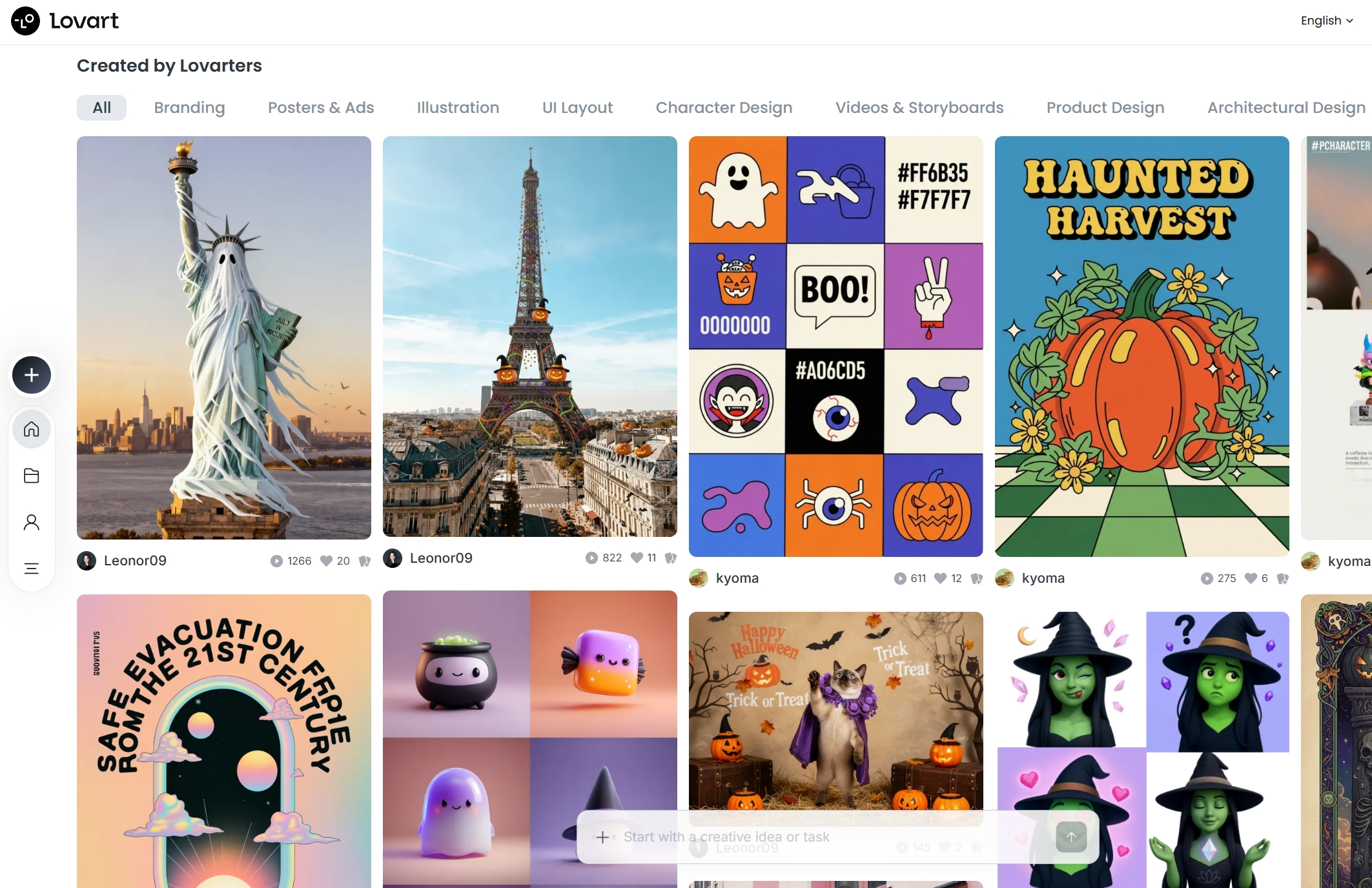
Lovart's infinite canvas provides a single, persistent workspace where all design elements coexist. Your logo sits alongside your packaging mockup, adjacent to your Instagram post template. The agent maintains visual consistency across everything because it sees the complete creative ecosystem, not isolated files.
How ChatCanvas Transforms the Creative Process
ChatCanvas is Lovart's breakthrough interface where human creativity and AI capability merge into a true collaborative partnership. Unlike traditional design software where you manipulate individual elements through menus and tools, ChatCanvas lets you "think and build together" with the AI agent.
Here's how it fundamentally changes the workflow:
Traditional Design Software Workflow:
-
Learn tool locations and keyboard shortcuts
-
Manually place and adjust every element
-
Export file and hope it looks right
-
Realize something needs changing
-
Reopen software, find the file, make adjustments
-
Repeat endlessly
ChatCanvas Design Agent Workflow:
-
Describe your vision in natural language
-
Agent generates complete design instantly
-
Refine through conversation: "Make the logo larger, shift the tagline down"
-
Agent updates the exact elements while preserving everything else
-
Continue iterating until perfect—all in the same workspace
This conversational iteration is transformative because it separates creative decision-making from technical execution. You focus on what you want; the agent handles how to make it happen.
The Nano Banana Technology Advantage
Powering Lovart's exceptional output quality is Nano Banana, an advanced image generation model specifically engineered for professional design work. While many AI image generators produce visually interesting pictures, Nano Banana delivers three critical capabilities that distinguish amateur output from professional-grade assets:
1. Texture Fidelity (The Realism Factor)
Nano Banana excels at rendering fine material details that make designs look tangible and professional. The weave of fabric, the grain of wood, the sheen of metal, the pores of skin—these micro-details create visual credibility. When generating product packaging, a coffee bag designed with Nano Banana shows realistic paper texture, subtle shadow depth, and authentic label adhesion that makes it indistinguishable from a professional photo shoot.
This texture fidelity matters enormously for non-designers because it eliminates the "AI-generated look" that undermines credibility. Your audience won't question whether your brand materials are professional—they simply are.
2. Cross-Project Consistency (The Brand Coherence)
One of the hardest challenges in design is maintaining visual consistency across multiple touchpoints. Your business card, website, packaging, and social media posts must feel like they belong to the same brand universe. Slight variations in color tone, logo proportions, or typography weight create subtle discord that trained eyes detect immediately.
Nano Banana's enhanced consistency engine maintains character identity, style, and proportions across multi-image sets. When you generate a complete brand kit, every asset shares perfect color harmony, proportional relationships, and aesthetic coherence. This consistency used to require meticulous manual attention—now it's automatic.
3. Surgical Precision Editing (The Refinement Control)
The ability to make localized edits without disturbing surrounding elements is crucial for professional refinement. Nano Banana's mask-aware editing lets you issue text-driven instructions like:
"Change the product bottle color from blue to rose gold, but keep everything else exactly the same."
The agent understands spatial context and modifies only the target element while preserving lighting, shadows, background, and composition. This precision eliminates the frustration of making one change that unexpectedly alters unrelated parts of your design.
Comparing Workflows: Traditional vs. AI Design Agent
| Design Task | Traditional Non-Designer Approach | Lovart AI Design Agent Approach | Time Savings | | --- | --- | --- | --- | | Create Business Logo | Learn logo design principles, study competitors, attempt design in template tool, hire freelancer after frustration | Describe brand values and aesthetic preference; agent generates 4-6 professional options in 30 seconds | 95% faster | | Design Product Packaging | Hire package designer ($2,000-$5,000), wait 2-3 weeks for concepts, provide feedback, wait for revisions | Upload product photo, describe packaging style, receive photorealistic mockups in 2 minutes | 99% faster, $5,000 saved | | Create Social Media Content Kit | Learn Canva, search stock photos, manually resize for each platform, export multiple files | Request "10-piece Instagram story set for eco-skincare brand," receive platform-optimized assets in 5 minutes | 90% faster | | Develop Course Materials | Search for relevant images, manually insert into document, ensure visual consistency across 20 pages | Describe lesson topics, agent generates custom illustrations and diagrams maintaining unified style | 85% faster | | Build Brand Identity System | Hire brand agency ($15,000+), undergo 6-week process, receive final deliverables | Conversational session creates logo, color palette, typography, usage guide, mockups in under 2 hours | 99% faster, $15,000 saved |
The time and cost differentials aren't incremental improvements—they represent fundamental transformation of who can access professional design quality.
How To Use Lovart: Step-by-Step Guide for Non-Designers
Let's walk through practical scenarios showing exactly how non-designers use Lovart to accomplish professional design work that was previously beyond their capability.
Scenario 1: Small Business Owner Creating Brand Identity
Context: Maria runs a new organic coffee roastery called "Sunrise Grounds." She needs a complete brand identity but has zero design experience and a limited budget.
Step 1: Start the Conversation
Maria signs up for Lovart and opens a new project in ChatCanvas. She types:
"I'm launching an organic coffee roastery called Sunrise Grounds. I need a warm, welcoming logo that appeals to environmentally conscious coffee lovers aged 25-45. The vibe should be earthy, premium but approachable."
What Happens: The AI Design Agent analyzes the brand positioning (organic, environmentally conscious), target audience (25-45 coffee enthusiasts), and aesthetic direction (warm, welcoming, earthy, premium-but-approachable). Within 30 seconds, it generates four distinct logo concepts on the canvas.

Step 2: Refine Through Conversation
Maria likes the second option but wants adjustments. She responds:
"I love option 2, but can you make the sun icon more stylized and change the color from orange to a softer terracotta? Also, try a handwritten-style font for 'Grounds.'"
What Happens: The agent makes these specific modifications while preserving the core design structure. The sun becomes more abstract and modern, the color shifts to a sophisticated terracotta tone, and the font changes to a natural handwritten style. The update appears in 15 seconds.
Step 3: Expand the Brand System
Now that Maria has her logo, she needs it applied across materials:
"Using this logo, create a complete brand kit: business cards, coffee bag packaging, social media profile images for Instagram and Facebook, and a loyalty card design."
What Happens: The agent generates a cohesive brand system, maintaining perfect color consistency, proportional relationships, and aesthetic unity across all touchpoints. The business card uses the logo at appropriate scale with contact information layout. The coffee bag packaging shows realistic mockups with proper label placement and material texture. Social media profiles optimize the logo for different platform dimensions. The loyalty card incorporates brand elements in a practical stamp-card format.
Total Time: 45 minutes from initial prompt to complete, production-ready brand system.
Traditional Alternative: Hiring a brand agency would cost $8,000-$15,000 and take 4-6 weeks. Learning to do it yourself would require months of software training and still produce mediocre results.
Scenario 2: Marketing Manager Creating Social Media Campaign
Context: James manages marketing for a mid-size e-commerce furniture store. He needs to create a seasonal campaign promoting summer patio furniture across Instagram, Facebook, and Pinterest. His design team is overloaded, and agencies quote $5,000 for the campaign creative.
Step 1: Establish Campaign Direction
James opens Lovart and initiates:
"Create a summer patio furniture social media campaign. The vibe should be relaxed coastal living—think whitewashed wood, blue accents, natural textures. I need 12 Instagram posts, 8 Facebook posts, and 6 Pinterest pins. Products include wicker chairs, outdoor sofas, and dining sets."
What Happens: The design agent generates a complete campaign concept, establishing a unified visual language: soft natural lighting, coastal color palette (whites, blues, sandy neutrals), lifestyle-focused compositions showing the furniture in aspirational settings. Each social media format is optimized for platform specifications.
Step 2: Request Specific Variations
James reviews the generated set and requests modifications:
"These look great. For Instagram, create additional versions showing the furniture at golden hour with warm sunset lighting. For Pinterest, add text overlays with sale percentages: '30% Off Summer Collection.'"
What Happens: The agent creates variations maintaining the core campaign aesthetic but adapting lighting conditions for Instagram posts and adding text overlays for Pinterest pins. Text is properly sized, readable, and follows platform best practices.
Step 3: Generate Motion Content
James wants to extend the campaign to Instagram Reels:
"Create a 15-second Instagram Reel showing these patio furniture pieces with smooth camera movements, transition effects, and upbeat background music."
What Happens: The agent generates a professional video sequence with product reveals, smooth transitions, and royalty-free music that matches the coastal relaxation theme.
Total Time: 2 hours to create a complete multi-platform campaign with 26 unique assets plus video content.
Traditional Alternative: Agency cost of $5,000 and 2-week turnaround, or attempting DIY creation in multiple tools over several days with inconsistent quality.
Scenario 3: Educator Creating Engaging Course Materials
Context: Dr. Susan teaches high school biology and wants to create visually engaging materials for her unit on cellular biology. Standard textbook illustrations bore students, but custom scientific illustration is expensive.
Step 1: Generate Educational Illustrations
Dr. Susan describes her needs:
"Create a series of scientifically accurate but visually engaging illustrations for high school biology: cell membrane structure, mitochondria cross-section, DNA replication process, photosynthesis stages. Style should be colorful, modern, and labeled clearly."
What Happens: The agent generates detailed educational illustrations that balance scientific accuracy with visual appeal. Each illustration uses consistent styling, color coding (matching throughout the series), and clear labels. The mitochondria cross-section shows internal structure with appropriately colored components. The DNA replication illustration uses arrows and numbered stages to clarify the process.
Step 2: Create Worksheet Templates
Dr. Susan needs accompanying worksheets:
"Using these illustrations, create 4 worksheets with diagrams for students to label, plus an answer key. Make them print-ready on standard 8.5x11 paper."
What Happens: The agent generates properly formatted worksheets with partially labeled diagrams, blank lines for student responses, and clear instructions. It automatically creates a corresponding answer key with correct labels.
Step 3: Design Presentation Slides
For classroom presentation:
"Create a 20-slide presentation on cellular respiration using these illustrations. Include title slides, process diagrams, and summary points. Use an educational but engaging design style."
What Happens: The agent generates a complete slide deck with consistent design, proper text hierarchy, strategic use of the custom illustrations, and logical information flow. Slides balance text and visuals following presentation best practices.
Total Time: 90 minutes to create a complete unit worth of custom educational materials.
Traditional Alternative: Commissioning custom scientific illustration costs $200-$500 per diagram. Creating professional presentations manually takes hours of formatting work. Total traditional cost: $2,000+ and 10+ hours of work.
Scenario 4: E-commerce Seller Creating Product Photography
Context: Alicia sells handmade ceramic mugs on Etsy but struggles with product photography. Her phone photos against white backgrounds look unprofessional compared to competitors with studio setups.
Step 1: Upload and Enhance
Alicia photographs her mug with her phone and uploads to Lovart:
"Take this mug photo and create professional product shots: one on a rustic wooden table with morning coffee setup, one in a cozy reading nook, one as a lifestyle shot in someone's hands. Use warm natural lighting."
What Happens: The AI product background generator analyzes the mug and generates three distinct scene contexts. The rustic table shot includes complementary elements (croissant, reading glasses, soft morning light). The reading nook shows the mug in an aspirational home setting with bookshelves and a cozy blanket. The lifestyle shot shows realistic hands holding the mug with proper lighting and skin texture.
Step 2: Create Listing Graphics
For her Etsy listing:
"Create an Etsy listing image set: main product photo with white background, lifestyle images, a size comparison diagram, and a benefits graphic highlighting 'handmade, microwave-safe, dishwasher-safe, 12 oz capacity.'"
What Happens: The agent generates a complete listing image set optimized for Etsy requirements. The white background shot uses proper studio lighting. The benefits graphic uses icons and clear typography. The size comparison shows the mug next to common objects for scale reference.
Step 3: Generate Seasonal Variations
For holiday marketing:
"Create festive versions of these product shots for Christmas: add holiday decorations in the background, use warm holiday lighting, and create a promotional banner saying '20% Off Holiday Collection.'"
What Happens: The agent generates seasonal variations maintaining product consistency while adding appropriate holiday context and promotional graphics.
Total Time: 60 minutes to create complete product photography suite with seasonal variations.
Traditional Alternative: Professional product photography costs $300-$1,000 per session. Seasonal updates require new photo shoots. DIY attempts with phone cameras produce mediocre results that hurt sales conversions.
Key Techniques for Non-Designers Using Lovart
Based on these scenarios, here are essential techniques that make the AI Design Agent most effective:
1. Start with Context, Not Commands
Instead of: "Make a logo"
Use: "Create a logo for my organic coffee roastery targeting environmentally conscious millennials, with an earthy, premium-but-approachable aesthetic"
Providing brand context, target audience, and aesthetic direction gives the agent the information it needs to generate appropriate designs on the first attempt.
2. Use Comparative Language
Instead of: "Change the design"
Use: "Make it more modern like Apple's aesthetic but warmer like IKEA"
Referencing familiar design examples helps the agent understand your aesthetic preferences without requiring you to know technical design terminology.
3. Iterate Incrementally
Instead of: "Actually, change everything"
Use: "Keep the overall design but change just the icon color to navy blue"
Making small, specific adjustments preserves what's working while refining details. This leverages the agent's precision editing capabilities.
4. Request Variations Simultaneously
Instead of: "Show me version 1... okay now version 2... now version 3"
Use: "Create 4 variations: one modern minimalist, one vintage retro, one bold graphic, one elegant sophisticated"
Generating multiple options at once lets you compare styles side-by-side and make informed decisions.
5. Specify Output Requirements
Instead of: "I need packaging"
Use: "Create coffee bag packaging designed for 12 oz bags, print-ready at 300 DPI, with visible label area for regulatory information"
Including technical specifications ensures output files meet production requirements without requiring multiple revision rounds.
Beyond Basic Design: Lovart as Your All-in-One Creative Partner
While we've focused on common non-designer needs, Lovart's capabilities extend across virtually every visual creation scenario. The beauty of a true design agent is its adaptability—the same conversational interface and multimodal generation applies to specialized industries and use cases.
Restaurant & Food Service Branding
Complete restaurant visual identity systems generated through conversation:
-
Restaurant logo design capturing your cuisine and atmosphere
-
Restaurant menu design optimizing both aesthetics and profitability
-
Food flyer design for promotional campaigns
-
Restaurant table tent design to increase add-on sales
-
Food packaging and label design for takeout and retail products
-
Cafe menu design for coffee shops and bakeries
-
Restaurant gift card design to boost revenue
-
Restaurant loyalty card design to increase repeat visits
Example Prompt: "Create a complete brand identity for my farm-to-table Italian restaurant. Generate logo, menu design, table tents featuring wine pairings, and Instagram story templates showcasing daily specials. Style should be rustic elegant with warm earth tones."
Real Estate Marketing Materials
Professional real estate marketing that converts:
-
Real estate logo design establishing your agent brand
-
Property listing design templates that highlight features
-
Real estate postcard design for direct mail campaigns
-
Real estate sign design that attracts buyers
-
Real estate business card design that makes memorable impressions
-
Real estate banner design for digital advertising
-
Property brochure design for open houses
-
Real estate newsletter design to nurture client relationships
Example Prompt: "Design a luxury property listing package for a 4-bedroom waterfront home. Include MLS listing graphics, social media posts, email newsletter feature, and print brochure. Style should be upscale contemporary with emphasis on water views and natural light."
Educational & Training Materials
Engaging learning content that improves comprehension:
-
Course material design for online and print courses
-
Classroom poster design that reinforces key concepts
-
Educational worksheet design for practice activities
-
Lesson plan design with visual organization
-
Certificate design for achievement recognition
-
Diploma design for graduation ceremonies
-
E-learning banner design to promote online courses
-
Student ID card design for institutions
Example Prompt: "Create a complete visual curriculum for my online photography course: 15 lesson illustrations explaining camera settings, 10 worksheet templates for exercises, 5 motivational posters for technique reminders, and graduation certificates. Style should be modern, professional, and visually clear."
E-commerce & Product Marketing
Visual assets that drive sales conversions:
-
Professional product photography with AI-generated backgrounds
-
Wine label design for wineries and boutique brands
-
Album cover design for musicians
-
Book cover design that attracts readers
-
Product packaging design across categories
-
Social media content kits for product launches
-
Email marketing graphics optimized for conversions
Example Prompt: "Generate e-commerce visuals for my handmade jewelry line: white background product shots, lifestyle images showing the jewelry worn in various settings, Instagram story templates for product reveals, and email header graphics. Maintain a consistent luxe-bohemian aesthetic across all assets."
Marketing & Promotional Content
Professional marketing materials without agencies:
-
Flyer design for events and promotions
-
Banner design for digital advertising
-
Poster design for campaigns
-
Infographic design to visualize data
-
Social media content calendars with consistent branding
-
Email newsletter graphics and headers
-
Trade show booth graphics and signage
Example Prompt: "Create a product launch campaign for my new sustainable water bottle: social media countdown posts (7 days), launch day announcement graphics, influencer collaboration kit, email marketing graphics, and trade show poster. Color scheme: ocean blues and clean whites, messaging: plastic-free lifestyle."
Specialized Creative Tools
Beyond standard design needs, Lovart offers specialized AI tools accessible to non-designers:
-
AI Logo Generator for instant brand identity
-
AI Background Remover for clean product isolation
-
AI Image Enhancer to improve photo quality
-
AI Image Upscaler for resolution enhancement
-
AI Anime Generator for unique character art
-
AI Art Generator for custom digital artwork
-
Image to Video Converter for motion content
-
Chat to Image Generator for conversational creation
Each tool integrates seamlessly within the Lovart platform, allowing you to combine capabilities without switching applications or learning new interfaces.
The Future of Design Is Conversational
The emergence of AI Design Agents represents more than technological advancement—it represents fundamental democratization of creative capability. For the first time in history, the ability to produce professional-quality visual content is accessible to anyone who can describe what they envision.
This democratization has profound implications:
For Small Businesses: You compete visually with Fortune 500 brands without Fortune 500 budgets. Your organic coffee roastery's branding can look as polished as Starbucks. Your Etsy shop's product photography rivals major retailers.
For Educators: You create engaging, custom learning materials that dramatically improve comprehension without graphic design training or illustration budgets.
For Marketers: You maintain rapid campaign iteration cycles, testing multiple creative directions simultaneously and optimizing based on real performance data rather than pre-committing to single expensive creative executions.
For Entrepreneurs: You validate business ideas through professional mockups before investing in inventory or services. You present pitches with stunning visuals that communicate vision effectively to investors and partners.
The traditional design industry isn't disappearing—professional designers will always add irreplaceable value for complex, highly specialized work. But the vast middle ground of "good enough professional quality" is now accessible to everyone. The design affordability paradox has been solved.
Getting Started with Lovart
Ready to experience the power of conversational design? Here's how to begin:
-
Sign Up: Visit Lovart.ai and create your free account
-
Explore the Canvas: Open ChatCanvas and familiarize yourself with the infinite workspace
-
Start Simple: Begin with a single project—a logo, a social media post, or a product mockup
-
Iterate Conversationally: Refine your design through natural language feedback
-
Expand Gradually: As you become comfortable, tackle more complex multi-asset projects
The learning curve isn't about mastering software—it's about learning to articulate your creative vision clearly. The more specific your descriptions, the better your results.
Pro Tip: Start your prompts with context (your business, target audience, use case) before describing visual details. This gives the AI agent the strategic framework to make appropriate creative decisions.

分享文章