Pixlr AI Image Generator Review: Features, Output Quality, Testing & Comparison


Pixlr AI Image Generator Review: Features, Output Quality, Testing & Comparison
In this review, we’re focusing exclusively on the Pixlr AI Image Generator—not Pixlr’s AI photo editing or enhancement features. Pixlr has long been known for its lightweight, browser-based design tools, and its AI image generator aims to bring the same simplicity to AI-powered creativity.
This article is based on hands-on testing, real prompt experiments, and close analysis of the generated outputs. We’ll break down what the Pixlr AI Image Generator does well, where it falls short, and how it compares with other popular AI image generation tools on the market.
If you’re wondering whether Pixlr’s AI image generator is worth your time—or how it stacks up against competitors—this review will give you a clear, practical answer without the fluff.
What Is Pixlr AI Image Generator?
Pixlr is an online creative platform that started as a simple browser-based photo editor and gradually evolved into a full ecosystem of design tools. Over the years, it has attracted millions of users by offering fast, accessible, and beginner friendly creative solutions without the steep learning curve of professional software.
The Pixlr AI Image Generator is Pixlr’s text-to-image tool, designed to turn written prompts into original visuals using artificial intelligence. Instead of manually designing or editing images, users simply describe what they want to see, choose a style, and let the AI generate images within seconds. Its primary goal is to make image creation quick, intuitive, and accessible to anyone—regardless of design experience.
This tool is especially suited for:
Designers needing quick visual concepts or inspiration
Marketers creating social media or ad visuals
Content creators building blog images or thumbnails
Beginners who want results without learning complex tools
Unlike traditional design tools that rely on manual editing and layers, the Pixlr AI Image Generator focuses on instant creation through prompts.
How Pixlr AI Image Generator Works
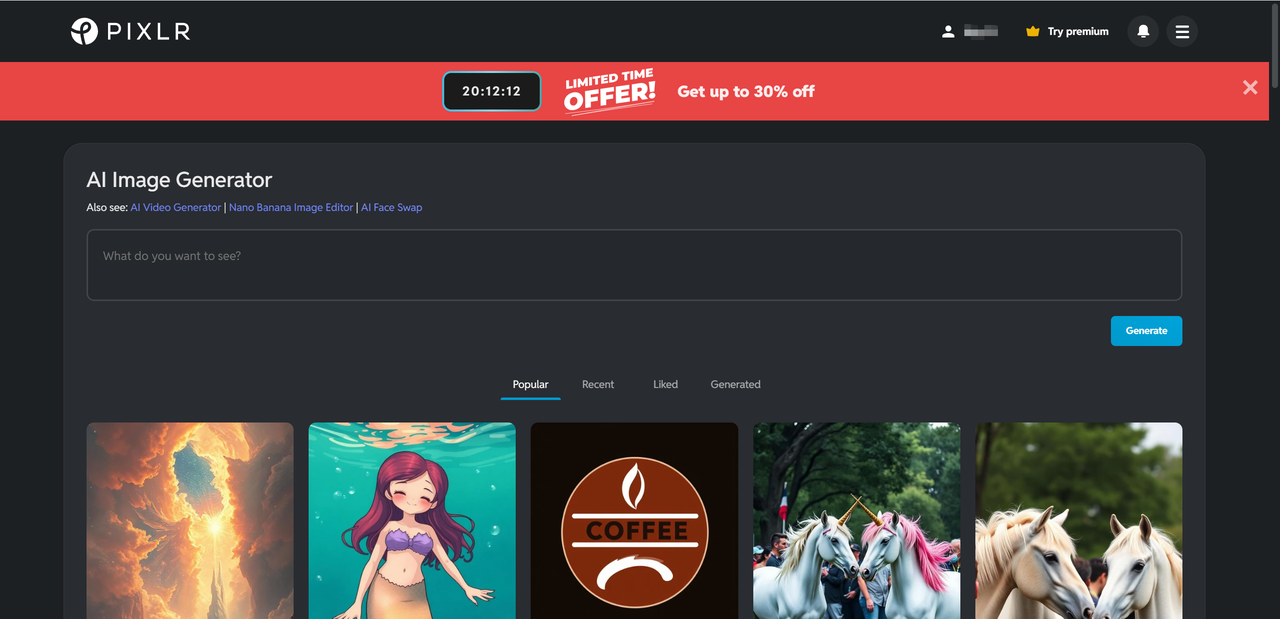
At its core, the Pixlr AI Image Generator follows a straightforward text-to-image workflow that keeps things simple, even for first-time users. You start by entering a written prompt that describes the image you want to create. This can be as short as a single idea or as detailed as a full scene description. The AI then interprets your text and generates images that match your description.
To help guide the results, Pixlr offers a selection of visual styles. These styles influence the overall look and feel of the image—such as realistic, artistic, or illustrated—without requiring any technical knowledge. You can also choose basic resolution options, allowing you to generate images suitable for web use, social media, or light design work.
One of Pixlr’s biggest advantages is accessibility. The Pixlr AI Image Generator runs entirely in your browser, meaning there’s no software to install and no heavy system requirements. You can jump in from almost any device and start generating images instantly.
Thanks to its clean interface and minimal setup, the tool is especially friendly for beginners. Even users with zero design background can create usable visuals within minutes, making experimentation easy and low-pressure.
Pixlr AI Image Generator Key Features
The Pixlr AI Image Generator keeps its feature set focused and approachable, prioritizing ease of use over overwhelming complexity. Instead of burying users in technical controls, it delivers a streamlined experience that still offers enough flexibility for creative experimentation.
Text-to-Image Generation
Text-to-image generation is the foundation of the Pixlr AI Image Generator. Users can enter simple prompts like “a futuristic city at sunset” or more descriptive instructions with mood, lighting, and subject details. The AI generally interprets prompts accurately, capturing the main ideas without requiring prompt-engineering expertise. While highly complex scenes may produce mixed results, the creativity range is solid for everyday use, making it suitable for quick visuals, ideas, and inspiration-driven projects.

Style & Visual Customization Options
Pixlr offers a variety of predefined visual styles that help shape the final output. Users can switch between more artistic, illustrated, or realistic looks depending on their needs. These styles are particularly useful for different use cases, such as social media graphics, concept art, blog illustrations, or marketing visuals. While customization isn’t deeply granular, the style presets provide enough control to noticeably change the tone and aesthetic of generated images.

Output Speed & Usability
Image generation is fast, with results typically appearing within seconds. The interface is clean and intuitive, allowing users to focus on creativity rather than settings. This makes the Pixlr AI Image Generator especially appealing for beginners and anyone who values speed and simplicity over advanced tweaking.
Pixlr AI Output Quality Review
When evaluating Pixlr AI output, the results are generally impressive. In most tests, the generated images are clear, visually appealing, and immediately usable for digital content. Subjects are usually well-defined, and compositions tend to follow common design principles, such as balanced framing and clear focal points.
Image clarity is strong at standard web resolutions, making the Pixlr AI output suitable for blog visuals, social media posts, thumbnails, and basic marketing materials. Colors are vibrant without appearing oversaturated, and the AI does a decent job maintaining visual consistency across the scene. Lighting, shadows, and mood are often handled well, especially in stylized or semi realistic images.

Prompt adherence is another area where Pixlr performs reliably. The AI typically captures the core idea of a prompt, including setting, subject, and overall style. However, like many AI image generators, it can struggle with very detailed instructions or complex multi-subject scenes. Fine details—such as hands, facial expressions, or text within images—may occasionally look unnatural or inconsistent.
The main strengths of Pixlr AI output lie in speed, simplicity, and visually pleasing results without heavy prompt tuning. Its limitations become more noticeable in high-detail realism or professional design needs.
Overall, Pixlr AI output is best suited for:
Social media and content marketing visuals
Blog and website illustrations
Concept art and creative inspiration
Quick mockups and idea exploration
For everyday creative tasks, the quality strikes a practical and reliable balance.

Pixlr AI Test – Real-World Prompt Experiments
To evaluate real performance, this Pixlr AI test focused on practical, everyday prompts rather than idealized examples. The goal was to see how the tool handles common creative needs across different categories, using simple and moderately detailed text prompts without advanced prompt engineering.
The tests included several prompt types:
Landscape scenes (nature, cityscapes, fantasy environments)
Portrait-style prompts (single subjects with mood and lighting)
Product-style visuals (objects on clean or styled backgrounds)
Abstract and artistic concepts (color-driven or mood-based ideas)
Across multiple generations of the same prompt, Pixlr showed decent consistency in style and composition. While no two images were identical, the AI generally maintained the same visual theme, color palette, and subject placement, which is helpful for creators who need variations of a single idea.
What worked best were landscapes, illustrated scenes, and stylized concepts. These prompts produced visually rich and cohesive images with minimal effort.

Where Pixlr struggled was with highly detailed portraits, complex poses, or scenes requiring precise object placement. Minor inconsistencies in anatomy or fine details occasionally appeared, especially in repeated tests.

Overall, the Pixlr AI test results show that the tool excels in creative exploration and quick visuals, while ultra precise or hyperrealistic use cases remain more challenging.
Pixlr AI Image Generator Comparison With Other AI Image Tools
This Pixlr AI comparison highlights how Pixlr stacks up against some of the most well-known AI image generators. Each tool serves a different audience, and the differences become clear when comparing output quality, usability, and learning curve.
Pixlr AI vs Midjourney
Midjourney is known for its highly detailed, artistic output, often surpassing Pixlr in visual complexity and realism. However, that quality comes with a steeper learning curve and a less intuitive interface. Pixlr AI, by contrast, is far more accessible, running directly in the browser with a simple prompt workflow. While Midjourney suits advanced artists, Pixlr is better for quick, everyday image generation.

Pixlr AI vs DALL·E
DALL·E focuses heavily on creative interpretation and prompt understanding, sometimes producing more imaginative results. Pixlr AI is easier for beginners, with clearer style options and faster onboarding. In terms of realism, DALL·E can outperform Pixlr in detailed scenes, but Pixlr offers more predictable and consistent outputs for basic creative tasks and marketing visuals.

Pros and Cons of Pixlr AI Image Generator
Like any creative tool, the Pixlr AI Image Generator comes with clear strengths and a few trade-offs. Understanding these pros and cons helps set realistic expectations, especially if you’re deciding between beginner friendly tools and more advanced AI platforms.
Pros
Beginner friendly interface that requires no prior design or AI experience
Fast image generation, delivering results within seconds
No installation required, as everything runs directly in the browser
Good balance between control and simplicity, offering styles without overwhelming settings
Cons
Limited advanced controls compared to professional AI tools like Midjourney or Stable Diffusion
Output consistency depends heavily on prompt quality, especially for complex scenes
Overall, Pixlr AI Image Generator excels at accessibility and speed but may feel restrictive for users seeking deep customization or highly technical outputs.

Is Pixlr AI Image Generator Worth It? Final Verdict
Based on hands-on testing, the Pixlr AI Image Generator delivers fast, visually appealing results with minimal effort. Its strengths lie in beginner friendly usability, browser-based accessibility, and consistent output for landscapes, illustrations, and marketing visuals. Limitations include less advanced control and occasional inconsistencies with complex prompts.
Overall, it performs exceptionally well for creators, marketers, and beginners who need quick, reliable visuals without steep learning curves. For detailed or hyper-realistic projects, other tools may be preferable. For everyday image generation and idea exploration, Pixlr AI is definitely worth trying. For a different approach focused on detailed control, you can try Lovart AI.

Compartilhar Artigo